top of page
DINOSIGN HD PLAYER SETUP GUIDE
Set Up Your Device
STEP 1
Connect the Player to the TV
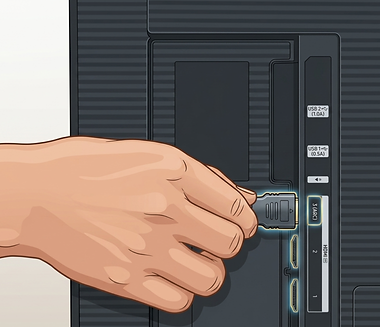
Take your Micro-HDMI to HDMI cable. Plug the small end into the Micro HDMI Port on your Player. Plug the large end into an empty HDMI slot on your TV.
Note: Remember the number next to the port on the TV (e.g., "HDMI 2").


STEP 2
Switch TV Input
Using the TV remote (not the remote included with your player) turn on the TV. Press the Source or Input button and select the HDMI number you used in the previous step.
STEP 3
Power on the Player
Plug the power supply into your DinoSign players USB-C Port. The device will boot automatically. After a short period you should see the DinoSign logo displayed on your TV, shortly after the WiFi configuration screen will be displayed.

Next Step: Connect to Wi-Fi
You're almost there! To finish setting up your player, follow our WiFi Setup Guide.
bottom of page